Installation
1. ROS Installation
2. Building a real-time Linux Kernel
For real time installation follow the steps for Ubuntu 20.04 in this link.
Warning
Bellow Steps is under development. (Do not follow)
This tutorial begins with a clean Ubuntu 20.04.1 install on Intel x86_64. Actual kernel is 5.13.0-39-generic, but we will install the Latest Stable RT_PREEMPT Version. To build the kernel you need at least 30GB free disk space.
Check https://wiki.linuxfoundation.org/realtime/start for the latest stable version, at the time of writing this is “Latest Stable Version 5.13-rt”. If we click on the link http://cdn.kernel.org/pub/linux/kernel/projects/rt/5.13/, we get the exact version. Currently it is patch-5.13-rt1.patch.xz.

We create a directory in our home dir and switch into it with
$ mkdir ~/kernel
$ cd ~/kernel/
We can go with a browser to https://mirrors.edge.kernel.org/pub/linux/kernel/v5.x/ and see if the version is there. You can download it from the site and move it manually from /Downloads to the /kernel folder, or download it using wget by right clicking the link using “copy link location”. Example:
$ wget https://mirrors.edge.kernel.org/pub/linux/kernel/v5.x/linux-5.13.1.tar.gz
unpack it with
$ tar -xzf linux-5.13.1.tar.gz
download rt_preempt patch matching the Kernel version we just downloaded over at http://cdn.kernel.org/pub/linux/kernel/projects/rt/5.13/
$ wget http://cdn.kernel.org/pub/linux/kernel/projects/rt/5.13/patch-5.13-rt1.patch.gz
$ gunzip patch-5.13-rt1.patch.gz
Then switch into the linux directory and patch the kernel with the realtime patch
$ cd linux-5.13.1
$ patch -p1 < ../patch-5.13-rt1.patch
We simply want to use the config of our Ubuntu installation, so we get the Ubuntu config with
$ cp /boot/config-5.13.0-39-generic .config
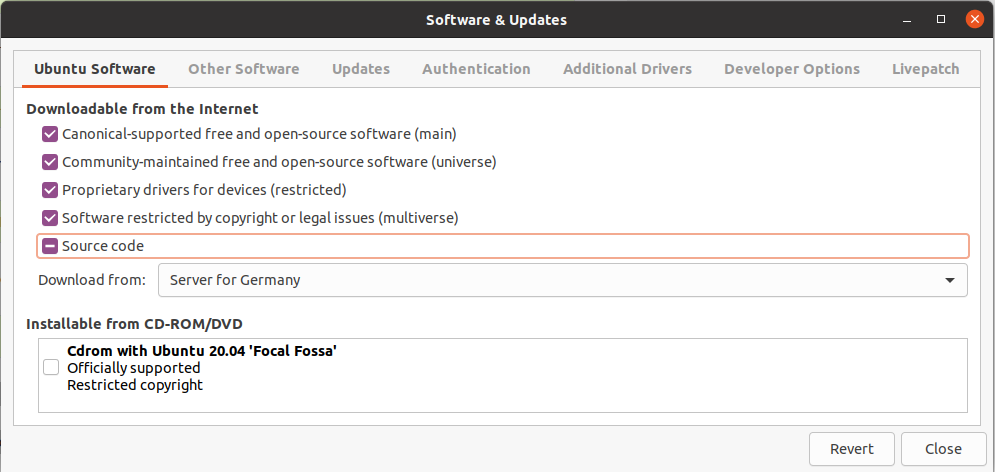
Open Software & Updates. in the Ubuntu Software menu tick the ‘Source code’ box and close.
We need some tools to build kernel, install them with
$ sudo apt-get build-dep linux
$ sudo apt-get install libncurses-dev flex bison openssl libssl-dev dkms libelf-dev libudev-dev libpci-dev libiberty-dev autoconf fakeroot
To enable all Ubuntu configurations, we simply use
$ yes '' | make oldconfig
Then we need to enable rt_preempt in the kernel. We call
$ make menuconfig
and set the following
# Enable CONFIG_PREEMPT_RT
-> General Setup
-> Preemption Model (Fully Preemptible Kernel (Real-Time))
(X) Fully Preemptible Kernel (Real-Time)

# Enable CONFIG_HIGH_RES_TIMERS
-> General setup
-> Timers subsystem
[*] High Resolution Timer Support

# Enable CONFIG_NO_HZ_FULL
-> General setup
-> Timers subsystem
-> Timer tick handling (Full dynticks system (tickless))
    (X) Full dynticks system (tickless)

# Set CONFIG_HZ_1000 (note: this is no longer in the General Setup menu, go back twice)
-> Processor type and features
-> Timer frequency (1000 HZ)
(X) 1000 HZ

# Set CPU_FREQ_DEFAULT_GOV_PERFORMANCE [=y]
->  Power management and ACPI options
-> CPU Frequency scaling
-> CPU Frequency scaling (CPU_FREQ [=y])
    -> Default CPUFreq governor (<choice> [=y])
    (X) performance
Save and exit menuconfig. Now we’re going to build the kernel which will take quite some time. (10-30min on a modern cpu)
$ make -j `nproc` deb-pkg
After the build is finished check the debian packages
$ ls ../*deb
Then we install all kernel debian packages
sudo dpkg -i ../*.deb
Now the real time kernel should be installed. Reboot the system and check the new kernel version.
$ sudo reboot
$ uname -a
3. Docker Install
Follow the instruction here to install docker on Ubuntu OS. And follow the bellow steps to complete the docker installation.
sudo curl -L "https://github.com/docker/compose/releases/download/1.29.2/docker-compose-$(uname -s)-$(uname -m)" -o /usr/local/bin/docker-compose
sudo chmod +x /usr/local/bin/docker-compose
docker-compose --version